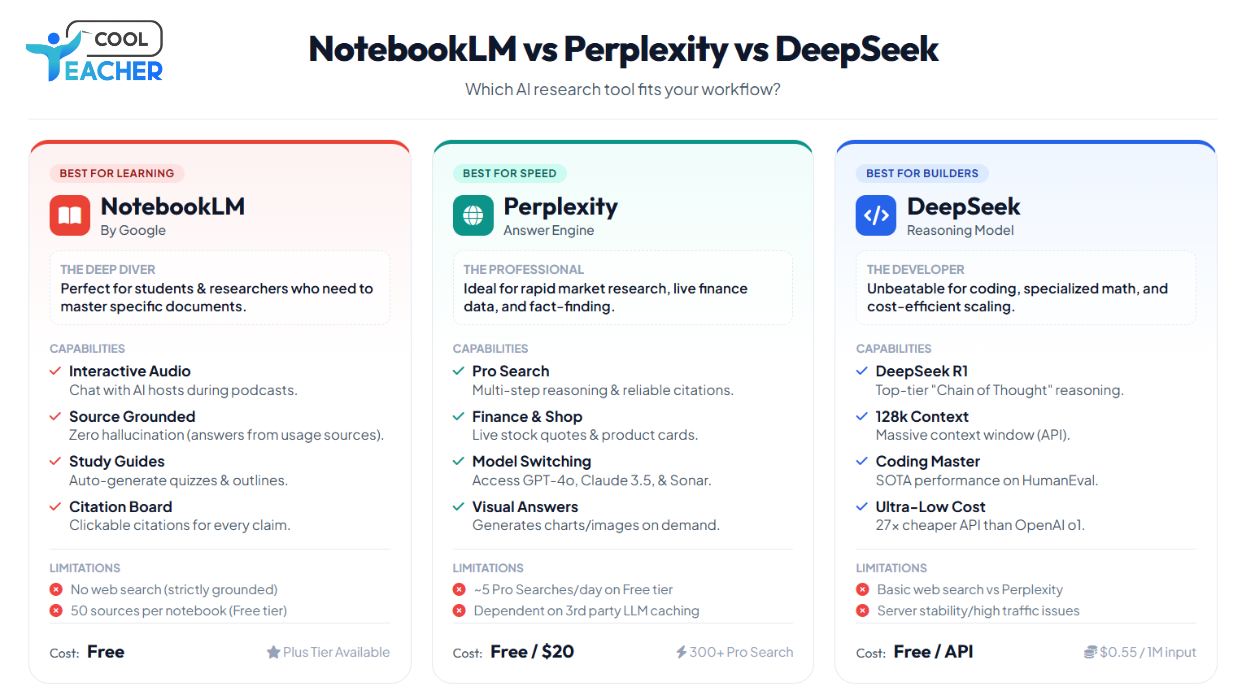
NotebookLM vs Perplexity vs DeepSeek: Which AI Research Tool Should You Actually Use?
I spent 50+ hours testing all three. Here's what shocked me.
As a Data Science and AI trainer working with 500+ professionals, I'm constantly asked: "Which AI tool should I use for research?"
The answer isn't what you think.
After deep-diving into NotebookLM, Perplexity, and DeepSeek for the past three months, I've discovered something fascinating: they're not really competitors at all. They're solving completely different problems.
Let me break down what nobody's telling you.
The TL;DR (Because You're Busy)
Use NotebookLM if: You have your own documents and need deep analysis with podcast-style summaries
Use Perplexity if: You need real-time web research with citations and fast answers
Use DeepSeek if: You want GPT-4 level reasoning at near-zero cost, especially for coding and math
But that's oversimplified. Let's dig deeper.
NotebookLM: Your Personal AI Research Assistant
What Makes NotebookLM Special
Google's NotebookLM isn't just another AI chatbot. It's designed around YOUR documents, not the entire internet.
The Game-Changing Feature: Audio Overviews
NotebookLM can generate podcast-style summaries where two AI hosts discuss your uploaded documents. I uploaded a 50-page research paper on transformer architectures, and within minutes, I had a 15-minute podcast explaining it in conversational English.
But here's what blew my mind: you can now JOIN the conversation in real-time and ask questions directly to the AI hosts. It's like having two research assistants who've read everything and can explain it to you while you're working out.
Recent Updates (December 2024)
NotebookLM now features Deep Research, which automates complex online research and generates insightful reports. This bridges the gap between document analysis and web research.
Key features include:
-
Capacity expanded to 300 sources per notebook (150 million words) for Plus subscribers
-
New 3-panel interface organizing sources, chat, and studio functions
-
Flashcards and quizzes generated automatically from your documents
-
Support for Google Sheets, Word docs, and images
What I Love About NotebookLM
1. Source-Grounded Responses Every answer includes direct citations to your uploaded documents. No hallucinations pulling from random internet sources.
2. Study Guide Generation Upload lecture notes and instantly get structured study guides with key concepts, questions, and terms. My students use this religiously before exams.
3. The Notebook System Organize different projects (one for ML research, another for client work, etc.). Each notebook maintains its own context.
4. Free (Mostly) The base version is completely free. NotebookLM Plus costs money but only if you need 300+ sources per notebook.
Where NotebookLM Falls Short
-
No real-time web search (though Deep Research helps)
-
Limited to documents you upload (can't just ask "what's trending in AI?")
-
Podcast generation takes 2-3 minutes (not instant)
-
No coding execution (it's analysis-only)
Perplexity: The Real-Time Research Engine
Why Perplexity Is Different
Perplexity processed 780 million queries in May 2025, up from 230 million in mid-2024. That explosive growth tells you something: people are switching from Google.
The Core Value: Speed + Sources
Perplexity doesn't just give you an answer. It searches the web in real-time, synthesizes information, and gives you inline citations. You can verify everything instantly.
Recent Game-Changers
Perplexity's Deep Research mode completes most research tasks in under 3 minutes while scoring 93.9% on the SimpleQA factuality benchmark. For comparison, that significantly exceeds leading models.
The new features that matter:
-
AI patent search, Email Assistant trial, live flight status tracking
-
Comet browser launched free in October 2025 for all users
-
Pro Search uses 3x more sources for in-depth research
-
Access to Claude Sonnet 4.5, GPT-4, and other frontier models
What I Love About Perplexity
1. Real-Time Information Need the latest AI news? Stock prices? Election results? Perplexity has it. NotebookLM can't do this.
2. Source Transparency Every claim has a number. Click it, you see the original source. This builds trust.
3. Pro Search Mode When you need depth, Pro Search digs deeper with more sources and better synthesis. I use this for competitive analysis.
4. Mobile Excellence The mobile app is phenomenal. Voice search works flawlessly. Great for research on the go.
5. Model Choice Access Claude, GPT-4, Gemini, and more through one interface. No need to switch between platforms.
Where Perplexity Falls Short
-
No document upload (can't analyze your own files like NotebookLM)
-
No audio summaries (purely text-based)
-
Pro tier required for best features ($20/month)
-
Can't "learn" from your specific documents
DeepSeek: The Cost-Effective Powerhouse
The Story That Shook Silicon Valley
In January 2025, DeepSeek released its R1 model trained for just $6 million, compared to OpenAI's $100 million for GPT-4. Within days, the app topped Apple's App Store, and tech stocks plummeted as investors reassessed AI valuations.
Why? Because DeepSeek proved you don't need hundreds of millions to build frontier AI.
What Makes DeepSeek Special
DeepSeek isn't trying to be a research assistant or search engine. It's a reasoning powerhouse optimized for:
-
Complex mathematical problems
-
Advanced coding tasks
-
Chain-of-thought reasoning
-
Logic-heavy problem solving
The Architecture That Changed Everything
DeepSeek-V3 uses a Mixture-of-Experts architecture with 671B total parameters but only 37B activated per token. This makes it both powerful and efficient.
DeepSeek-R1 demonstrated capabilities like self-verification, reflection, and generating long chains of thought. It literally shows its work, making it perfect for education.
What I Love About DeepSeek
1. Insane Cost Efficiency API pricing is dramatically cheaper than OpenAI. For high-volume users, this is a game-changer.
2. Open Source Released under MIT License, meaning you can use it commercially, modify it, run it locally. True ownership.
3. Reasoning Transparency DeepSeek shows its chain-of-thought process. You see HOW it arrived at an answer, not just the answer. Perfect for learning.
4. Coding Excellence For software development and algorithm design, DeepSeek-V3 consistently outperforms competitors in benchmarks.
5. No Censorship (Mostly) Being Chinese-developed, it has different content policies. Some find this refreshing, others concerning.
Where DeepSeek Falls Short
-
No web search (can't look up current information)
-
No document analysis (can't upload PDFs like NotebookLM)
-
Text only (no image generation, no multimodal)
-
Censorship concerns (blocks certain political topics)
-
Data privacy questions (Chinese company, data sovereignty issues)
Head-to-Head Comparison
Feature Matrix
| Feature | NotebookLM | Perplexity | DeepSeek |
|---|---|---|---|
| Document Analysis | ✅✅ Best-in-class | ❌ Can't upload | ❌ Can't upload |
| Web Search | ⚠️ Limited (Deep Research) | ✅✅ Real-time, excellent | ❌ None |
| Audio Summaries | ✅✅ Podcast-style | ❌ Text only | ❌ Text only |
| Cost | ✅✅ Free (mostly) | ⚠️ $20/month Pro | ✅✅ Very cheap API |
| Reasoning | ⚠️ Good | ⚠️ Good | ✅✅ Exceptional |
| Coding | ❌ No execution | ⚠️ Basic | ✅✅ Excellent |
| Citations | ✅✅ Source-grounded | ✅✅ Inline sources | ⚠️ None |
| Math/Logic | ⚠️ Basic | ⚠️ Good | ✅✅ Outstanding |
| Current Events | ❌ Limited | ✅✅ Real-time | ❌ Training cutoff |
| Open Source | ❌ Proprietary | ❌ Proprietary | ✅✅ MIT License |
Real-World Use Cases: When To Use What
Scenario 1: Academic Research Paper
Task: Analyze 10 research papers and write a literature review
Best Tool: NotebookLM
-
Upload all 10 papers
-
Generate study guide to identify key themes
-
Use chat to compare methodologies
-
Create audio overview to review while commuting
-
Export notes for your literature review
Why not Perplexity? Can't upload and deeply analyze your specific papers. Why not DeepSeek? No document upload, no source management.
Scenario 2: Market Research for Startup
Task: Understand competitor landscape and market trends
Best Tool: Perplexity Pro
-
Real-time search for latest company news
-
Pro Search for comprehensive competitor analysis
-
Check financial data and funding rounds
-
Export research with sources for investor deck
Why not NotebookLM? Can't search web for current market data. Why not DeepSeek? No web access, training cutoff makes it outdated.
Scenario 3: Complex Algorithm Development
Task: Design and implement a novel ML algorithm
Best Tool: DeepSeek-R1
-
Step-by-step reasoning for algorithm design
-
Code generation with best practices
-
Mathematical proof verification
-
Cost-effective for multiple iterations
Why not NotebookLM? Can't execute code or validate algorithms. Why not Perplexity? Not optimized for deep technical reasoning.
Scenario 4: Learning New Technical Concept
Task: Master transformer architecture from scratch
Best Tool: Combination Strategy
- Perplexity: Find and curate best learning resources
- NotebookLM: Upload resources and generate study materials + podcast
- DeepSeek: Ask for step-by-step explanations of complex math
Why all three? Each handles a different part of the learning pipeline.
The Pricing Breakdown
NotebookLM
-
Free: 100 notebooks, 50 sources each (500K words per source)
-
Plus: Higher limits, included with Google One AI Premium
Best for: Students, researchers, budget-conscious professionals
Perplexity
-
Free: Limited queries, basic models
-
Pro ($20/month): 300+ Pro searches/day, advanced models, file uploads
-
Max ($200/month): Unlimited Labs, early access to features, Comet browser priority
Best for: Professional researchers, content creators, businesses
DeepSeek
-
Chat (Free): Generous free tier on website/app
-
API: Pay-per-use, dramatically cheaper than OpenAI
- DeepSeek-V3: $0.27 per million input tokens
- For comparison, GPT-4: $2.50-$5.00 per million tokens
Best for: Developers, high-volume API users, cost-conscious businesses
My Personal Workflow: How I Use All Three
Morning Research Routine:
- Perplexity - Catch up on AI news, industry trends (15 mins)
- NotebookLM - Review yesterday's notes via audio overview (during workout)
Client Project:
- Perplexity Pro - Gather competitive intelligence and market data
- NotebookLM - Upload all research, generate briefing doc
- DeepSeek API - Generate custom analysis code for data processing
Course Creation:
- Perplexity - Find latest tutorials and resources
- NotebookLM - Analyze and organize into curriculum
- DeepSeek - Generate coding examples and exercises
The Controversial Take
None of these tools will exist in their current form in 18 months.
Here's why:
-
NotebookLM will add web search (they're already testing Deep Research)
-
Perplexity will add document analysis (it's the obvious next move)
-
DeepSeek will add multimodal (they already have Janus for vision)
The lines are blurring. Eventually, we'll have unified platforms that do everything.
But for now, you need to know which tool for which job.
The Bottom Line: My Recommendations
For Students & Researchers
Primary: NotebookLM (free, perfect for papers and studying) Secondary: Perplexity Free (for current events and quick research) Optional: DeepSeek Chat (for tough math/coding problems)
For Content Creators & Writers
Primary: Perplexity Pro (research + citations + current info) Secondary: NotebookLM (organize sources, generate outlines) Skip: DeepSeek (not designed for content creation)
For Developers & Engineers
Primary: DeepSeek API (cost-effective, excellent reasoning) Secondary: Perplexity (technical documentation search) Optional: NotebookLM (organize technical specs and docs)
For Business Professionals
Primary: Perplexity Pro (market intelligence, competitive analysis) Secondary: NotebookLM Plus (internal document analysis) Consider: DeepSeek API (custom analysis workflows)
What I'm Watching For in 2025
NotebookLM:
-
Enterprise features (team collaboration, security)
-
More languages for audio overviews
-
Better integration with Google Workspace
Perplexity:
-
Deeper document analysis features
-
Better API for developers
-
Expansion of Comet browser features
DeepSeek:
-
International expansion (outside China)
-
Addressing data privacy concerns
-
Multimodal capabilities
The Truth Nobody Talks About
The real power isn't in picking one tool. It's in knowing when to use each one.
I've trained 500+ professionals, and the ones who succeed fastest are the ones who master this skill: Tool Selection Intelligence.
They don't waste time asking ChatGPT about their internal documents (use NotebookLM). They don't expect NotebookLM to know yesterday's news (use Perplexity). They don't pay OpenAI premium prices when DeepSeek works just as well.
The meta-skill is knowing which tool for which problem.
Your Next Steps
-
Try NotebookLM first (it's free and impressive)
- Upload 3-5 PDFs related to a project
- Generate an audio overview
- Listen during your commute
-
Test Perplexity (free version is solid)
- Research a competitor
- Use Pro Search (if you have Pro)
- Compare results to Google
-
Experiment with DeepSeek (free chat or cheap API)
- Give it a complex math problem
- Ask for code with explanation
- Compare reasoning to GPT-4
After a week, you'll know which fits your workflow.
My Ask to You
I'm genuinely curious: Which of these three do you use most, and why?
Have you found a use case where one dramatically outperforms the others?
Drop your experience in the comments. Let's learn from each other.
About the Author I'm a Data Science, Machine Learning, and Agentic AI trainer, helping professionals and students master cutting-edge AI technologies. If you found this helpful, follow me for more honest AI tool comparisons.
Want deeper training on using AI tools effectively? Check out my courses on www.teachercool.com
#ArtificialIntelligence #NotebookLM #Perplexity #DeepSeek #AITools #Research #Productivity #DataScience #MachineLearning
Appendix: Technical Specs
NotebookLM Technical Details
-
Model: Gemini 2.0 Flash (as of Dec 2024)
-
Max Sources: 50 (free), 300 (Plus)
-
Context: 500K words per source
-
Audio: Up to 20 minutes per overview
Perplexity Technical Details
-
Models: Claude, GPT-4, Gemini, Sonar (proprietary)
-
API: Available (search + chat completions)
-
Languages: 46 supported
-
Deep Research: 2-4 minutes per report
DeepSeek Technical Details
-
Architecture: MoE with 671B params (37B active)
-
Training: FP8 mixed precision
-
Context: 128K tokens
-
License: MIT (open source)